Create Customized Report Shells
Generate a structured report shell using headings and sections tailored to your practice or district.
- Custom report headings
- Reusable report structures
- District or organization defaults
- Consistent formatting
Smarter Psych Reports
Build customized report shells, add testing-result tables, insert saved language, select recommendations, and complete reports more efficiently—all within Google Docs.
Designed specifically for school psychologists.
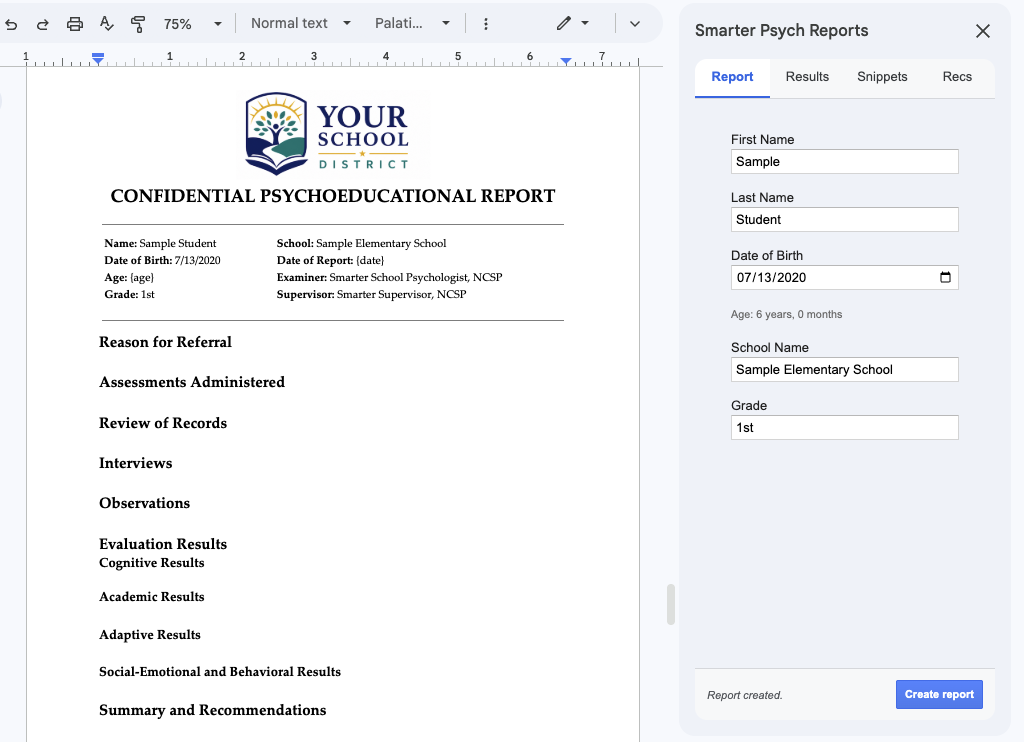
Smarter Psych Reports streamlines the repetitive parts of report writing while keeping you in control. Create organized reports, reuse commonly needed content, and maintain consistent formatting without leaving Google Docs.
No separate report-writing platform or unfamiliar editor.
Adapt headings, saved language, recommendations, and report structures.
You remain responsible for interpretation, conclusions, and final report content.
Generate a structured report shell using headings and sections tailored to your practice or district.
Insert professionally formatted tables for commonly used cognitive, academic, adaptive, and social-emotional measures.
Create and reuse language you frequently include in reports.
Select recommendations from a built-in library or add your own.
Complete common finishing steps without leaving the document.
Watch how Smarter Psych Reports helps you create a report shell, add testing results, insert saved language, select recommendations, and finalize a report directly in Google Docs.
Demo video coming soon
Opening the add-on · Creating a report shell · Adding results tables · Inserting saved language · Selecting recommendations · Finalizing in Google Docs
Smarter Psych Reports includes tools for adding results from commonly used cognitive, academic, adaptive, behavioral, emotional, and executive-function assessments.
More measures are being added regularly. Additional assessment support is available upon request.
Smarter Psych Reports supports your workflow without replacing your professional judgment.
Smarter Psych Reports supports your workflow—it does not replace your professional judgment.
Smarter Psych Reports runs directly inside Google Docs, allowing you to work in a familiar environment instead of moving reports between separate systems.
Smarter Psych Reports is designed for:
Standardize report structures and commonly used content while allowing each professional to individualize the evaluation.
Smarter Psych Reports does not automatically interpret test results or generate complete psychoeducational reports. It helps organize reports and insert user-selected content.
No. It creates report structures and helps insert tables, saved language, and recommendations. The evaluator writes and approves the individualized interpretation.
No. The current workflow does not require users to upload test protocols or score reports.
Yes. All content is inserted directly into Google Docs and remains editable.
Yes. Report sections and headings can be adapted to your practice or district requirements.
District and organization settings can support standardized report structures and commonly used content.
See the Assessment Support section for the current list of cognitive, academic, and rating scale measures. More are being added, and additional support is available upon request.
No. Smarter Psych Reports is currently designed for Google Docs.
Smarter Psych Reports is designed to work inside Google Docs and does not require uploading test protocols or score reports. Detailed privacy documentation will be published here as product materials are finalized.
Create organized, professional reports inside Google Docs while maintaining complete control over your evaluation and interpretation.
Start with a free trial on Google Workspace Marketplace. Full pricing details are coming next.